
Let AI agents work without limits.
Throughwalls is a system that makes it fast and easy to snapshot an entire workspace and move between snapshots whenever needed. This lets you give AI agents full control of the computer, because even if an agent accidentally deletes something important, you can instantly roll back to any previous snapshot.
ISO
Install Throughwalls
Download the ISO, install Throughwalls on a server, then manage it from your local machine with the CLI.
CLI
Install the CLI
Use the CLI from your local machine to connect to the workspace, create snapshots, and recover state.
brew install throughwalls/tap/throughwalls-cli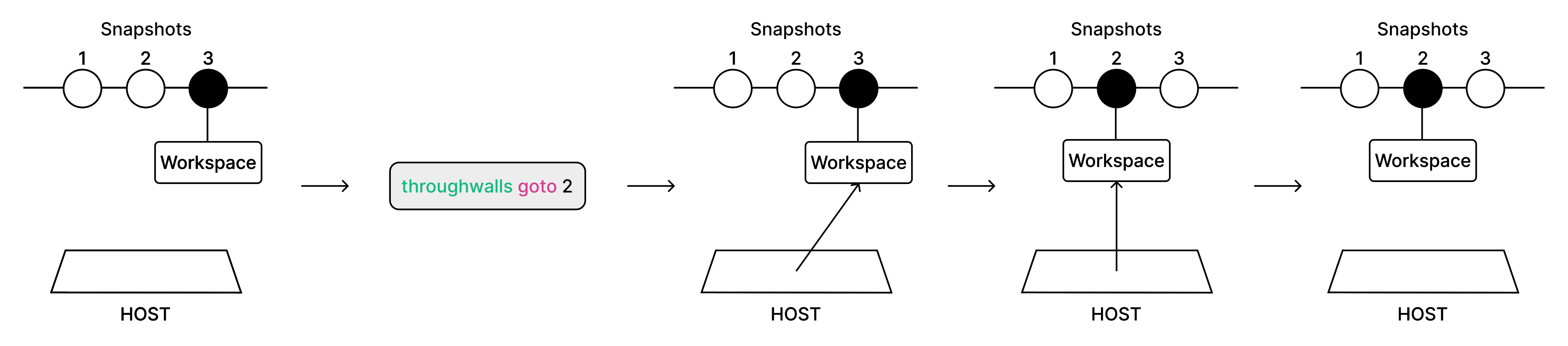
Workspace
A workspace is a standard virtual machine. It restores its state by switching between snapshots.
Snapshots
Snapshots save every file in the workspace. Because they are easy to create and move between, you can delegate full computer control to an AI agent. If it accidentally deletes something important, you can return to any previous state to recover lost files or continue from the exact point you need.
How the CLI Works
Most CLI commands send requests to the host. The host then manages snapshots, the workspace, and the rest of the system state. To use the CLI, first log in to the host with throughwalls host login.
Seamless Switching
A connection established with throughwalls connect reacts to snapshot changes made with throughwalls goto and automatically attaches you to the workspace with data from the selected snapshot. You do not need to manually reconnect after switching snapshots.