
Snapshots
Create and manage workspace snapshots from the CLI.
Creating Snapshots
To create a snapshot, use:
throughwalls snap create --comment <comment>The --comment flag is optional.
Line
You can view created snapshots with this command:
throughwalls lineExample output:
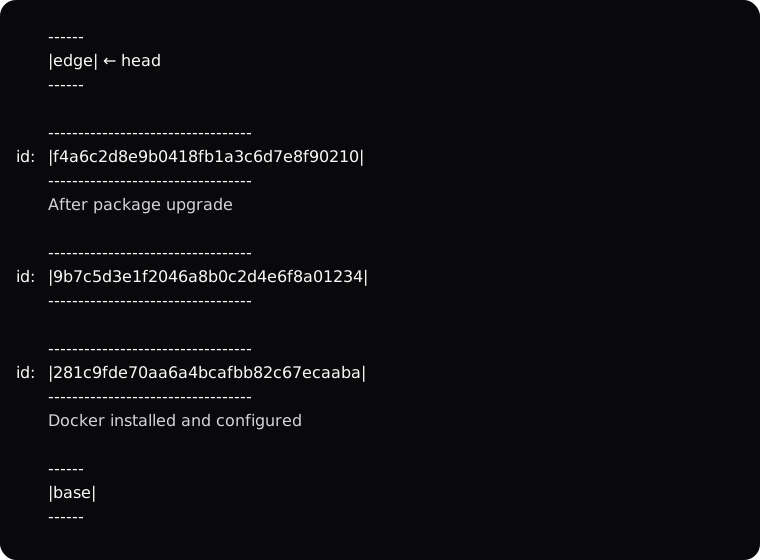
base is the Workspace state before any of your changes. If you need to switch back to the clean system state, run:
throughwalls goto baseedge is the state that contains all changes you have made since the latest snapshot. You can also switch to this state at any time with:
throughwalls goto edgeThe head pointer shows where you are now. You can also view the current position by running:
throughwalls line headSwitching Snapshots
Switch snapshots with this command:
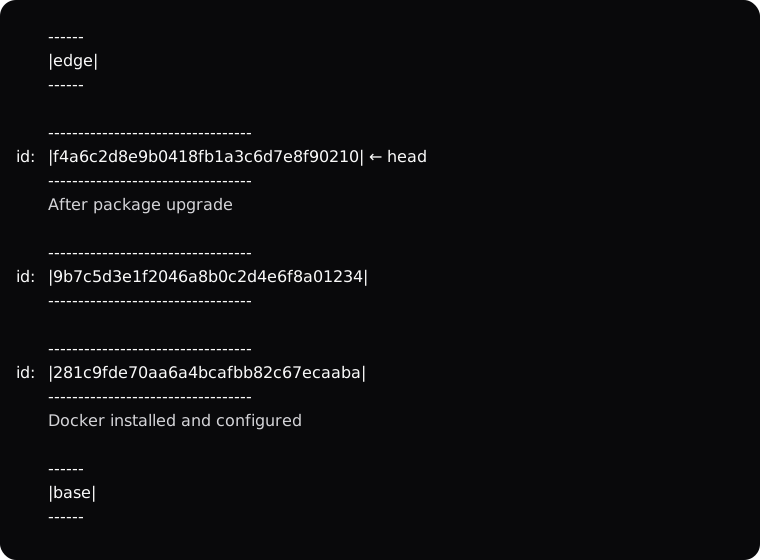
throughwalls goto <snapshot-id>For example, if you run throughwalls goto f4a6c2d8e9b0418fb1a3c6d7e8f90210, head moves to that snapshot and throughwalls line shows this:
When you run throughwalls goto, you can use --workspace-username, --workspace-password, --workspace-ssh-key, and --workspace-ssh-passphrase flags. Credentials passed to goto have higher priority than the credentials used by connect. For example, suppose the Workspace is currently on snapshot A. You run connect and pass --workspace-usernameuser_1. Then you decide to run goto to snapshot B. If you pass --workspace-usernameuser_2 to goto, then when connect reconnects to the Workspace, you enter the Workspace as user_2. If you do not pass new credentials to goto, connect keeps using the credentials that were used when it was first started. goto reads Workspace login data only from flags, not from environment variables or the config file.
Deleting Snapshots
You can manually delete any snapshot at any time with:
throughwalls snap delete <snapshot-id>Besides manual deletion, Throughwalls can automatically delete snapshots when you create a new one. These automatically deleted snapshots are grouped into Before head and After head.
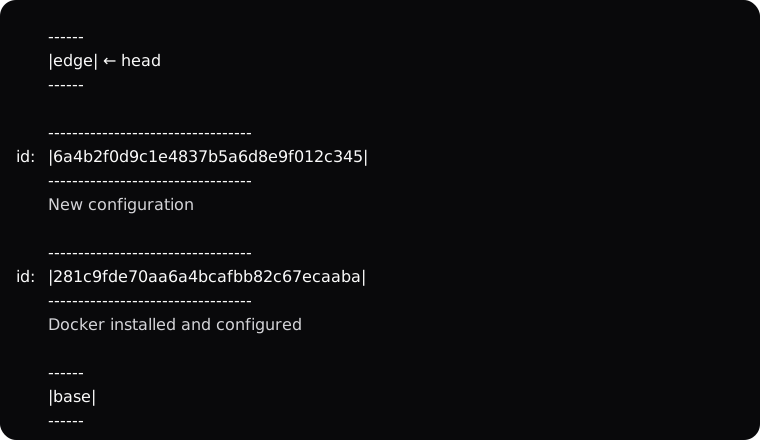
After head snapshots are deleted when you run throughwalls goto to any snapshot except the latest one or edge, and then run throughwalls snap create. This happens because Throughwalls currently supports only one line. For example, if you have three snapshots, go to the first one, and then create a new one, the two snapshots above it are deleted. Only the snapshot you were on and the new one after it remain.
If you run throughwalls goto 281c9fde70aa6a4bcafbb82c67ecaaba, then run throughwalls snap create --comment 'New configuration', and then run throughwalls line, you get this:
Before head snapshots start being deleted automatically over time as you create new snapshots. This happens for two reasons.
First, the number of snapshots is limited to 50. When you try to create the 51st snapshot, the oldest snapshot is deleted automatically.
Second, each snapshot takes up a certain amount of storage space. The storage budget for all snapshots is limited to roughly 30% of the storage available to Throughwalls on the server. For example, if 110 GiB is available for snapshots, you already have ten snapshots that take up 10 GiB each, and the new snapshot would take up 15 GiB, Throughwalls starts deleting snapshots from the beginning of the line until the total size of all snapshots, including the new one, fits within the allowed budget.
If you want to see exactly how many snapshots would be deleted if you created a new one now, run:
throughwalls snap create --dry-runOr:
throughwalls snap create --dry-run --lineThe --line flag shows a detailed diagram of what would be deleted.